WinEEG Advanced software allows for the recording, editing and analysis of continuously recorded EEG using a Mitsar amplifier. WinEEG advanced version allows the user all of the functions of the basic version and additionally the ability to import non-Mitsar format files, record Evented Related Potential data (with the use of PsyTask), and to perform database comparisons (with the addition of the HBI database).
Click here to download WinEEG, Security key drivers and Mitsar drivers.
WinEEG advanced version allows the user all of the functions of the basic version and additionally the ability to import non-Mitsar format files, record Evented Related Potential data (with the use of Psytask Software -sold separately) to perform database comparisons (with the addition of the HBI database).
WinEEG Advanced is included with Mitsar-202 amplifiers .
The Human Brain Institute normative database requires WinEEG advanced version at an additional fee.
Built-in client database for organization
All patient information including EEG waveform and video can be saved to build-in database or written on CD. Build-in database helps to automatically search recording and provide automatically data processing, data averaging and exporting.
In addition all data can be stored and reviewed on any Windows-based PC.
Import and Export of data
Raw EEG can be exported to files with different formats such as ASCII, Binary, EDF and etc. Raw EEG can be imported with WinEEG advanced version* from file with next formats EDF, EDF+, UDF, ASCII, LEXICOR, NeuroScan v.4.
EEG spectra, coherence, ERP, ERD and parameters of task performance can be exported to ASCII file automatically for collection of recordings selected by user.
EEGStudio.API
The Mitsar EEGStudio API for Matlab is designed in the form of a .NET Application comprised of Server and Client components. The Server component is built in into your EEGStudio software and is available upon purchase of the corresponding module. The Client component is compiled and is available in the form of EEGStudio_[date].dll supplied with your installation and located in the ..\EEG2Matlab\DLL folder.
This implementation uses relatively novel Matlab feature (starting R2009) that allows to execute .NET scripts and is based on an inter-process communication via Named Pipes protocol provided by the .NET framework.
Easy to use
Note that our solution does not implement a direct EEG machnie > MatLab communication. This way we exempt the researcher from the need to duplicate all necessary preprocessing steps (montaging, notchfiltering and etc.) in MatLab.
In our solution the researcher conditions the multichannel EEG timeseries using a convenient and easy to use EEGStudio interface. Then, upon user request the EEGStudio assumes the role of a server and streams the data to MatLab for real-time processing within BCI, neurofeedback or other user specific application.
While we think that split between standardized and user specific signal processing labor is natural and the most convenient we do also recognize that in some cases it is desirable to get access to the raw data and therefore provide such an option for EEGStudio software to stream nonmontaged and non-temporally filtered data into Matlab.
Wrapper
In order to further simplify the use of our API we developed a simple and concise Matlab wrapper class named EEGStudio (EEGStudio.m). Its methods implement basic features necessary to establish communication between Matlab and EEGStudio, to display the acquired timesries and save the input and
derived data to the disk.
MainTimer
EEGStudio class uses MatLab timer object(MainTimer) that can be programmed by the user for any period (iTimerPeriod) and number of repetitions (iTimerRepeats) to call any user defined callback function(default sTimerCBFunction) implementing all necessary processing and display.
In the current implementation the callback function only served the purpose of displaying the multichannel timeseries.
Short Latency Access
Our solution provides short latency access to the real-time data in a high-level programming environment such as Matlab. This allows to use the variety of toolboxes implementing well thought through signal processing, optimization, pattern classification and etc algorithms.
We hope that this API will find its users among researchers actively involved in development of new signal processing techniques for neurofeedback and brain-computer interface applications.
Devices supported
All devices supportted by EEGStudio
Recording
The EEG (up to 32 channels) is stored on the hard disk and available for subsequent analysis. During recording, the signals are continuously displayed on the screen. The software emulates the “moving” paper mode. Display screen uses paper EEG aspect ratio to simplify reading. EEG can be recorded synchronously with visual and acoustic stimuli presentation for ERP/ERD studies. ERPs and ERDs are computed in psychological tasks of various designs. The task design is performed by Psytask (the program written by our company is provided separately) or by the conventional Presentation software (Presentation, E-Prime). During EEG recording photoflash may be controlled manually or using predefined program. Automatic impedance measurement procedure helps to control a quality of electrodes setting.
Display
A flexible review program allows fast display of the EEG on the computer monitor and immediate access to any part of the recording. Ten user definable labels may be used to mark EEG recordings for future quick access to this part.
Montages and filters
Recorded EEG can be displayed in different montages: monopolar, bipolar, average reference, weighted average reference and etc. EEG can be filtered by IIR digital filters to change frequency band of recording to and eliminate environmental noise (50 or 60 Hz). Also EEG can be filtered by high order FIR filters.
Artifact correction
Advanced artifact rejection mode provides easy and fast search and elimination of bad EEG epochs. Artifact correction procedures are based on PCA or ICA decomposition of raw EEG and spatial filtering helps to increase quality of EEG record.
Spectral analysis and Brain Mapping
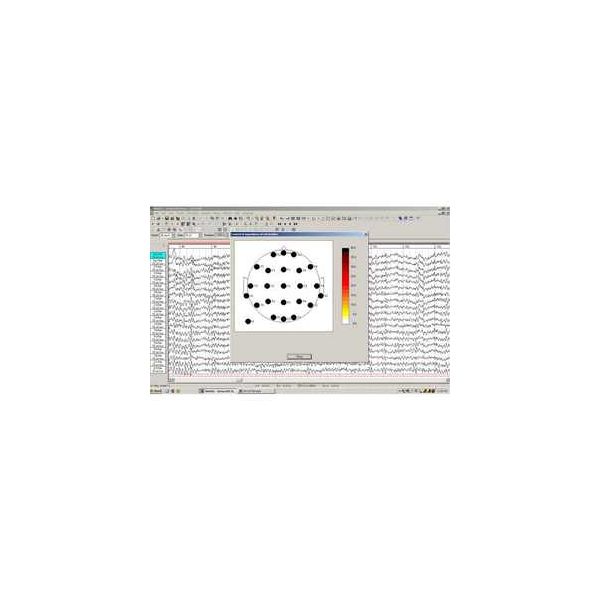
WinEEG software includes the multichannel spectral analysis, brain mapping and coherence. Power spectra and coherence can be computed for any selected part of recorded EEG. Different parameters of spectra computed for predefined frequency band ranges can be displayed as histograms, maps and tables. The spectra data can be exported to other applications (standard statistical packages such as STATISTICA or SPSS) by using ASCII format for a future statistical analysis.
Event Related Potentials, Event Related De/Synchronization, Wavelet Analysis
Visual and acoustic stimuli can be presented during the EEG recording so that event-related potentials (ERPs), event-related wavelet transform event-related de/synchronization (ERD/ERSs) and parameters of task performance (omission, commission errors, reaction time and its variance, measuring by special button) are computed off-line. Visual and auditory stimuli are presented on separate computer.
A set of conventional psychological tasks is provided. Latencies, amplitudes and topographic maps of different types of ERPs components (such as P300, mismatch negativity, GO/NOGO…), of desynchronization and synchronization components in different frequency bands can be measured and statistically assessed.
Automatic spike detection
Spike detector automatically detects, marks and averages spikes and sharp waves in EEG recording. High effective algorithm of automated spike detection based on both estimation of amplitude-temporal parameters of waveforms and equivalent dipole source applying to both raw EEG and decomposition of multi channel EEG on components (using PCA or ICA) helps to search for paroxysmal activity in long-term EEG records. Manual correction of results of spike detection algorithm provides a possibility to eliminate artifacts. Averaging of similar spike waveforms increases an accuracy of measurement.
Dipole source localization
Build in equivalent dipole localization algorithm help to identify a brain position of source of paroxysmal activity.
3D mapping
3D mapping of data can be performed by LORETA software to which mapped data is transferred automatically.
Averaging and data processing automation
The spectra, coherence, ERP, ERD and etc. can be process in automated mode for collection of recording selected by user. The results of processing will be automatically stored to build-in database.
The spectra, coherence, ERP, ERD and etc. can be averaging automatically mode for collection of recording selected by user.
Exporting and importing the data
Raw EEG can be exported to files with different formats such as ASCII, Binary, EDF and etc. Raw EEG can be imported from file with next formats EDF, UDF, ASCII, LEXICOR, NeuroScan v.4.
EEG spectra, coherence, ERP, ERD and parameters of task performance can be exported to ASCII file automatically for collection of recordings selected by user.
Built-in database
All patient information including EEG waveform and video can be saved to build-in database or written on CD. Build-in database helps to automatically search recording and provide automatically data processing, data averaging and exporting.
In addition all data can be stored and reviewed on any Windows-based PC.
Final report
Final report can be written using MS Word. The corresponding file will be created and opened automatically. Both selected final report template, tables of processing results and different pictures (copies of windows content) will be automatically placed in the text of final report.